Default Sigmoid Curve
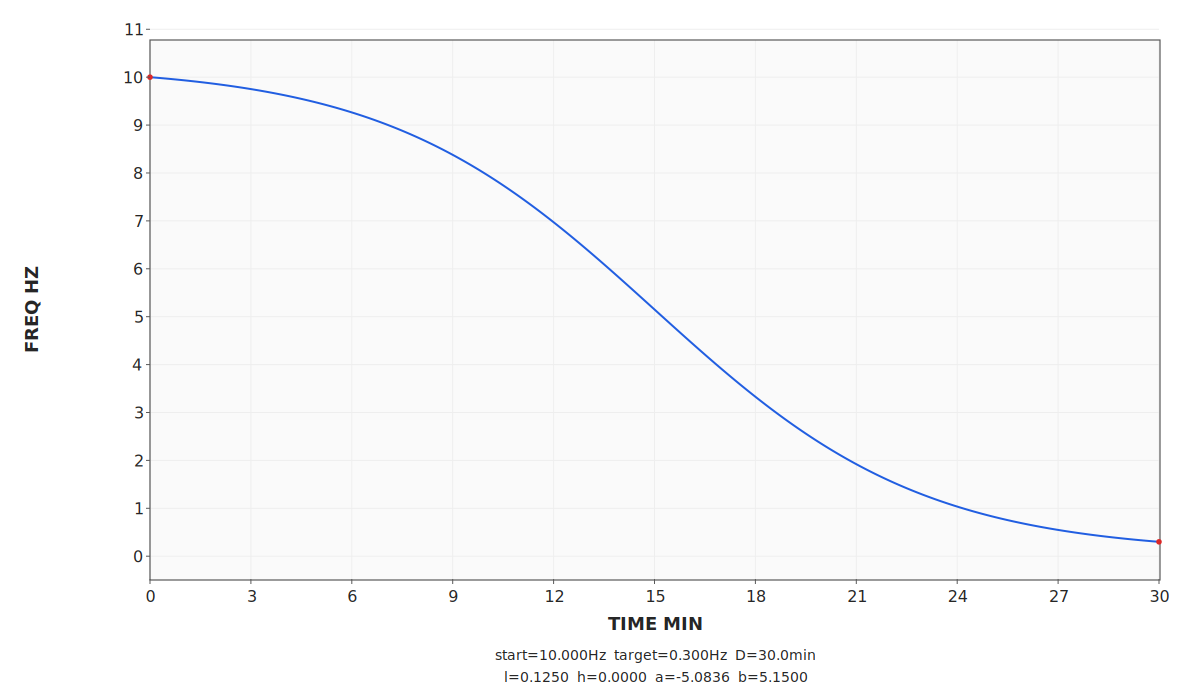
-G plots the built-in program curve over time.
Command: sbagenx -G -p sigmoid 00ls
Binaural, isochronic & monaural beat + mix generator
SBaGenX is an eclectic, modern fork in the lineage:
SBaGen → SBaGen+ → SBaGenX.
It keeps the power and scriptability, but now does so through a reusable engine layer:
sbagenxlib powers the CLI, the desktop GUI, and the Android app work now underway.
Maintained by Lech Madrzyk at www.sbagenx.com.
SBaGenX is no longer just a patched CLI fork. It now has a reusable engine, richer frontends, and clearer separation between authoring, playback, validation, and plotting.
sbagenxlib is now the central engine and public C API for SBaGenX.-p sigmoid program for smoother beat/pulse transitions.:l=<value>:h=<value> (order-independent).-p curve loads external .sbgf files for user-defined beat/carrier expressions..sbgf supports readable piecewise curve definitions and helper functions for advanced session shaping..sbgf solve blocks auto-fit constants from boundary equations at setup time.M in drop, sigmoid, and slide specs.SBAGEN_LOOPER metadata handling.SBAGEN_LOOPER supports one-time intro playback using i (required trailing space) before the loop range. This is very useful where you have an audio track with a clear introduction which then proceeds to audio which is easily loopable.-I adds isochronic envelope customisation over one cycle.-G plots whole-program beat/carrier trajectories for built-in programs such as drop, sigmoid, and curve.-P plots a one-cycle isochronic envelope/waveform preview rather than the full session curve.-A adds optional mix amplitude modulation with tunable parameters. (Conjecture: gradual linear mix decay may feel calming, while short periodic dips may briefly heighten awareness.)drop, slide, sigmoid, and curve directly in the GUI.sbagenxlib core rather than re-implementing the engine logic.
Two different plot modes generated directly by SBaGenX. -G is for whole-session / built-in program curves; -P is for one-cycle isochronic inspection.
-G plots the built-in program curve over time.
Command: sbagenx -G -p sigmoid 00ls
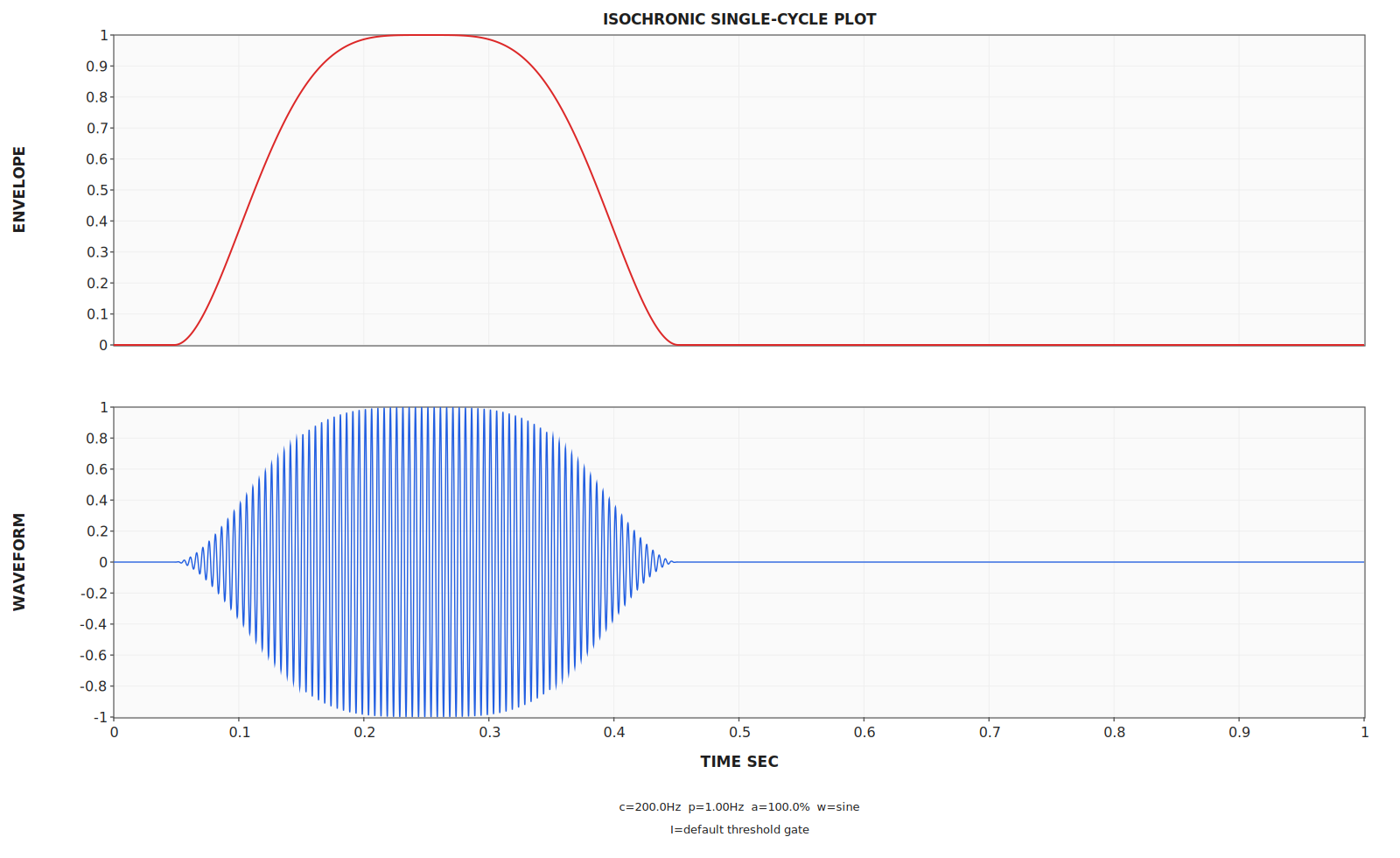
-P plots a single isochronic envelope/waveform cycle, not the full session.
Command: sbagenx -P -i 200@1/100
A one-minute graph-video example generated directly by
SBaGenX with a sigmoid drop using
00ls+/100:l=3, synced audio, and a
pulsating tracking dot.
Command:
sbagenx --graph-video sigmoid-target-l-demo.mp4 -G -p sigmoid t1,0,0 00ls+/100:l=3
The desktop GUI is now available, built directly on
sbagenxlib rather than wrapped around the CLI.
SBaGenX now includes a real desktop app for editing, validation, playback, and export, with the GUI integrated directly into the main project.
.sbg and .sbgf filessbagenxlibdrop, slide, sigmoid, and curveThis is still an early GUI release, but the core desktop workflow is now in place and improving on the main branch.
Current screenshot of the editor-centric SBaGenX desktop GUI.
Windows installer and Ubuntu package for the current stable release.
SHA256 values. The copy button uses your clipboard.
2d291d1f130f5ccef61dbec52e5454457046e8d31eac0001f2978fcda10efb03
f39a35b68721f8cd75a9a21ae8481eea74b663c19dba8d1081f345ca581666cd
Alpha Android builds are published separately from the desktop app and are being built on the same sbagenxlib engine rather than a separate reimplementation.
Validated, editor-centric Android build powered by sbagenxlib.
The Android app brings native validation, live editor diagnostics, persistent render context preparation, and mixed playback to phones and tablets while staying aligned with the desktop and CLI runtime semantics.
SHA256 value for the latest Android APK. The copy button uses your clipboard.
ff44d099ed1ff75313ff2b8dd684f99ae782ca40d72ea0174c77802aef7d94e9
Practical commands for a first run. Full option details are in the main docs.
sbagenx -h.
-G for built-in/session curve plots, -P for one-cycle isochronic plots, and -o for WAV/OGG/FLAC/MP3 output.
Copy/paste examples:
# 1) Check options
sbagenx -h

# 2) Run a built-in drop session with a bundled river mix
sbagenx -m river1.ogg -p drop 00ds+ mix/99

# 3) Sigmoid session with explicit shape params
sbagenx -m river1.ogg -p sigmoid 00ls+:l=0.125:h=0 mix/97

# 4) Plot the full sigmoid session curve as PNG (no audio output)
sbagenx -G -p sigmoid t30,30,0 00ls+:l=0.20:h=0

# 5) Plot one isochronic cycle preview
sbagenx -P -i 200@1/100

# 6) Render to OGG Vorbis (quality 6)
sbagenx -m river1.ogg -o session.ogg -U 6 -p sigmoid 00ls+:l=0.125:h=0 mix/97
See docs/SBAGENX.txt for full syntax, including monaural mode (M), isochronic mode (@), and mix modulation (-A).
Build custom beat curves in .sbgf files and use solve to fit unknown constants from boundary constraints. This is exposed through sbagenxlib and consumed by both the CLI and GUI.
.sbgf with solve# Target model: f(m) = A*exp(-l*m) + B
param l = 0.15
solve A,B : A*exp(-l*0)+B=b0 ; A*exp(-l*D)+B=b1
beat = A*exp(-l*m) + B
carrier = c0 + (c1-c0) * ramp(m,0,T)
Here, SBaGenX solves A and B at setup so the curve exactly matches beat(0)=b0 and beat(D)=b1. You tune curvature with :l=<value> from the command line.
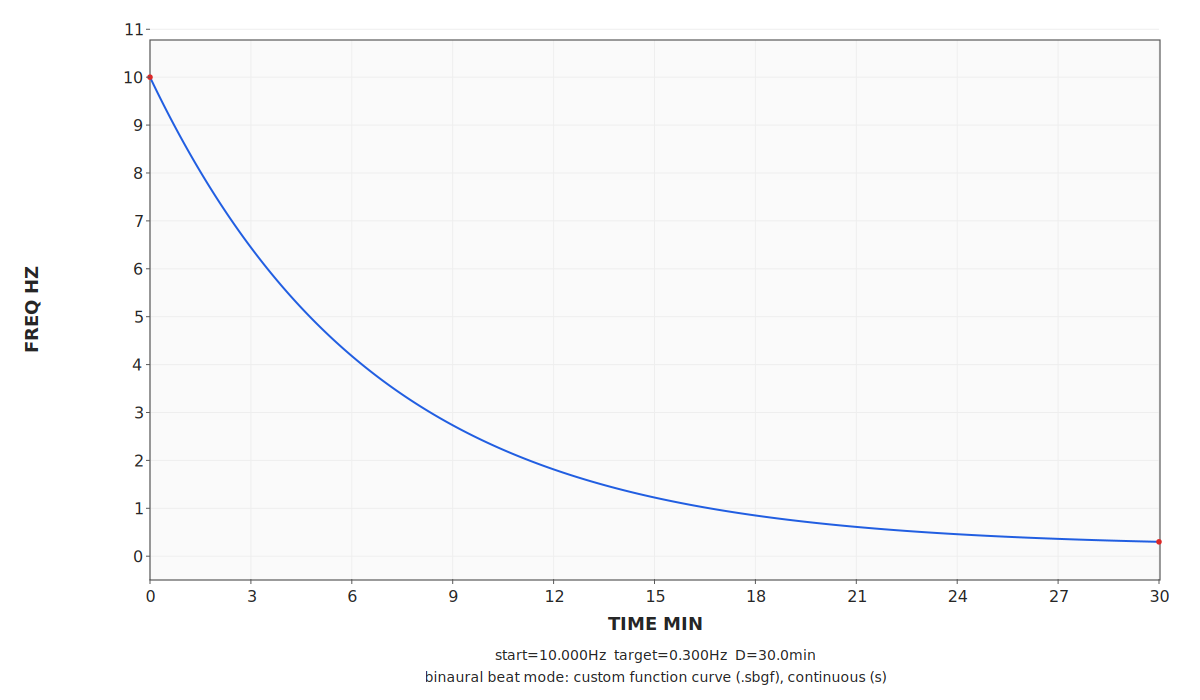
Command: sbagenx -G -p curve examples/basics/curve-expfit-solve-demo.sbgf 00ls:l=0.15
Where you share .sbg and .sbgf contributions. Start simple.
You are in the SBaGenX community space. If you have a useful session or function file, share it first and refine it later. Maintainers can help clean things up before formal curation.
Use the issue/PR workflow in the main repository for contributions. For discussion, ideas, and questions, use GitHub Discussions.
This is currently the active route for both contributions and community discussion.
.sbg for sessions or .sbgf for reusable curve/function definitions.
SBaGenX preserves clear lineage and upstream credit.
This site is designed to reuse the background from the original SBaGen / Uazú site as well as the icon for the SBaGenX program with permission and much gratitude. This project would not exist if not for the founder, Jim Peters', hard work.
assets/bg-tile.gif